Newa voice AI agent calls your leads back

The CRM that
sells for you.

BeeCRM's AI agent picks up the first message in WhatsApp, Instagram and Telegram, qualifies the lead, and hands a buy-ready customer to your sales rep. No implementation consultant, no training courses, no 50 useless modules.

See how it works
14 days free No credit card
5 min
to first lead
Meta
official WhatsApp API
1–3 days
onboarding
from $49
for the entire team
Trusted by
20+
companies have connected BeeCRM

Companies from tourism to real estate developers handle their WhatsApp, Instagram and Telegram inquiries in BeeCRM.

Client industries
  • Tourism
  • Real estate developers
  • Car dealers & tuning
  • Clinics & dentistry
  • Electronics & equipment
  • Resorts & hotels
  • Restaurants & banquet halls
  • Jewelry stores
  • Logistics
  • Education & courses
  • Wholesale
  • Services & consulting
Problem

Legacy CRMs
aren't built
for small
business.

One extreme — Excel and WhatsApp: everything works until a manager quits. The other — a 50-module enterprise suite where onboarding takes two months and your team still uses 10% of the features.

01

Team drowning in WhatsApp and Excel

Sales rep leaves — half your customers go with them. No one sees the conversation history, no one remembers who promised what.

02

Big CRMs need months to roll out

amoCRM, Bitrix24 — that means a consultant, training, configuration. Small business loses time and pays the integrator more than the software itself.

03

AI bolted on as an afterthought

Old CRMs treat "AI" as an "ask the bot" button. You need an employee that runs the deal: replies in chat, creates tasks, hands off to the rep.

04

Paying for modules you don't use

Calls, documents, HR, site builder — all in the plan. You use three, you pay for thirty. Local businesses count every som.

Where money leaks

How much money slips away because of slow replies?

A messenger customer writes to several companies at once and buys from whoever answers first. See what the delay costs you.

How fast you usually reply
You lose about
~135 000
som a month
≈ 90 inquiries a month go to competitors

In BeeCRM this is calculated from your real data: the “Where we lose money” screen lists unanswered chats, stalled deals, unpaid invoices and overdue tasks — with amounts in som.

How we estimate

An estimate based on assumptions, not a study. Inquiries per day × 30 × share of customers who leave without waiting (within 5 min — 5%, within 30 min — 15%, within 2 hours — 30%, later or next day — 45%) × inquiry-to-sale conversion 10% × average order. The assumptions are average — your numbers may differ.

Solution

What BeeCRM does differently.

Six things that make customers switch from amoCRM, Bitrix24 and Google Sheets. No 50 modules, no training courses, no implementation contractors.

AI agent in chatsLive

Replies and sells 24/7

WA · IG · TG

Answers “how much”, finds the need, offers an option and creates a task for the rep. WhatsApp, Instagram and Telegram — around the clock.

  • #WhatsApp
  • #Instagram
  • #Telegram
Voice agentNew

Calls customers about their requests

enabled on request

Calls a customer who left a request, clarifies details and books a meeting. Introduces itself as a virtual assistant; the call summary lands in the deal card.

  • #Calls
  • #Meetings
  • #Call summary
One inboxLive

WA · IG · TG in one window

official API

Official WhatsApp Business API, Instagram Direct and Telegram. Voice notes, media and reactions go straight into the lead card.

  • #WhatsApp API
  • #Direct
  • #Voice notes
ScenariosLive

No-code automation

visual builder

Condition → action: no reply — a reminder in an hour; phone left — a welcome message.

  • #Auto-replies
  • #Reminders
1CLive

Orders and stock in place

two-way sync

Exchange with 1C: product catalog, stock levels, deal export.

  • #Stock
  • #Catalog
  • #Deals
AnalyticsNew

Numbers, not gut feel

in som

Stage conversion, first-response time, revenue per rep and the “Where we lose money” screen.

  • #Conversion
  • #Response time
  • #Money leaks
Voice AI agent

Hear how the AI calls.

A customer leaves a request — a manager hands the call to the voice agent in one click: it clarifies the key points and books a meeting. The call summary and recording stay in the deal card.

  • Says up front that it is a virtual assistant — never pretends to be human
  • Books a meeting, schedules a callback or follows up in WhatsApp
  • Connected on request to your telephony and your script
 
Press play — subtitles will appear here
1:04

Demo recording (in Russian): the BeeCRM AI agent’s voice, a call about an inbound request

Call transcript (English translation)
  1. Marusya · AI agent: Hello, Timur! My name is Marusya, I’m a virtual assistant from the sales team — that is, an AI. Yesterday you left a request for an apartment in our new residential complex. Do you have a couple of minutes?
  2. Customer: Yes, hello. Sure.
  3. Marusya · AI agent: Great. What kind of apartment are you looking for — how many rooms?
  4. Customer: Two rooms. Preferably no higher than the seventh floor.
  5. Marusya · AI agent: Got it: two rooms, up to the seventh floor. And how do you plan to buy — outright or in installments?
  6. Customer: Installments, probably. A down payment of about thirty percent.
  7. Marusya · AI agent: Good, we have options like that. It’s best to see the floor plans in person with a manager at the sales office. Does Saturday at eleven a.m. work for you?
  8. Customer: Saturday works, let’s do eleven.
  9. Marusya · AI agent: I’ve booked you for Saturday at eleven. Our manager Aibek will prepare a selection of two-room apartments and installment terms. I’ll send the address to WhatsApp. Have a nice day!
  10. Customer: Thank you, goodbye.
How it works

See BeeCRM in action.

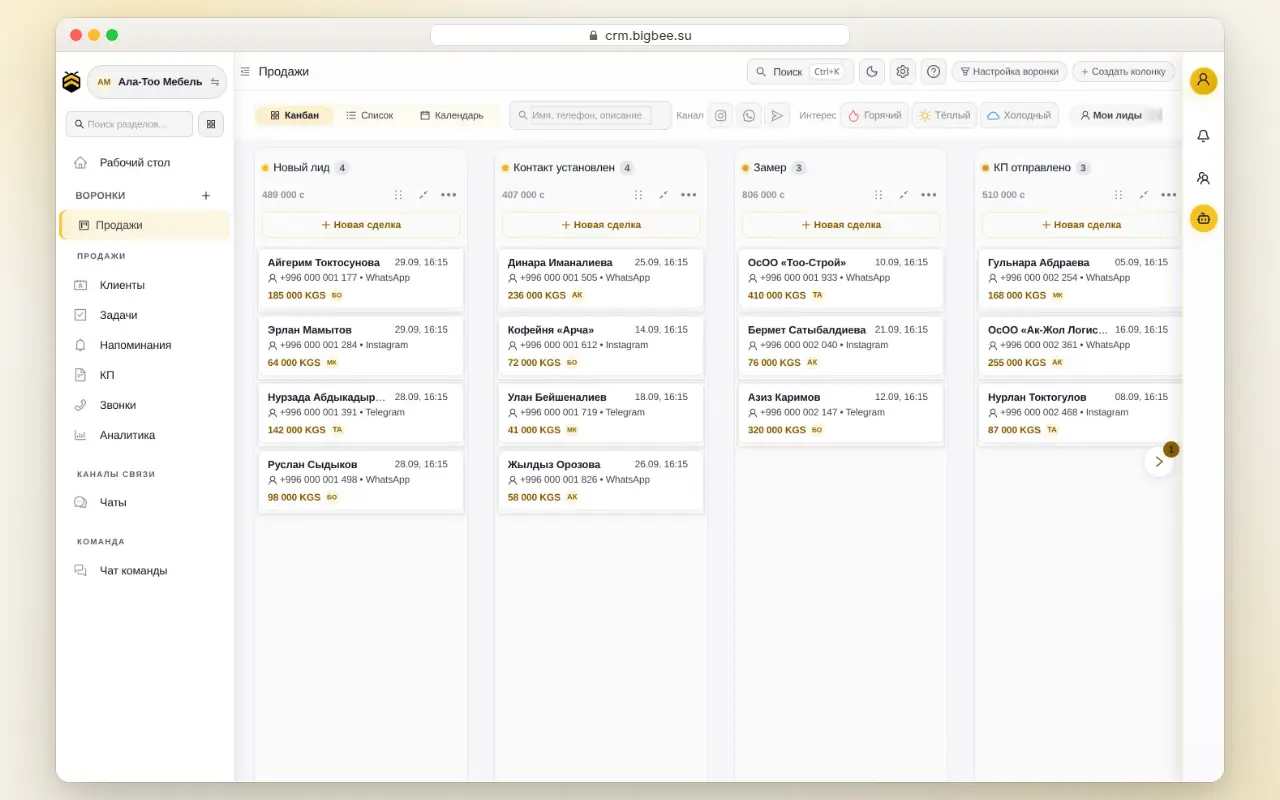
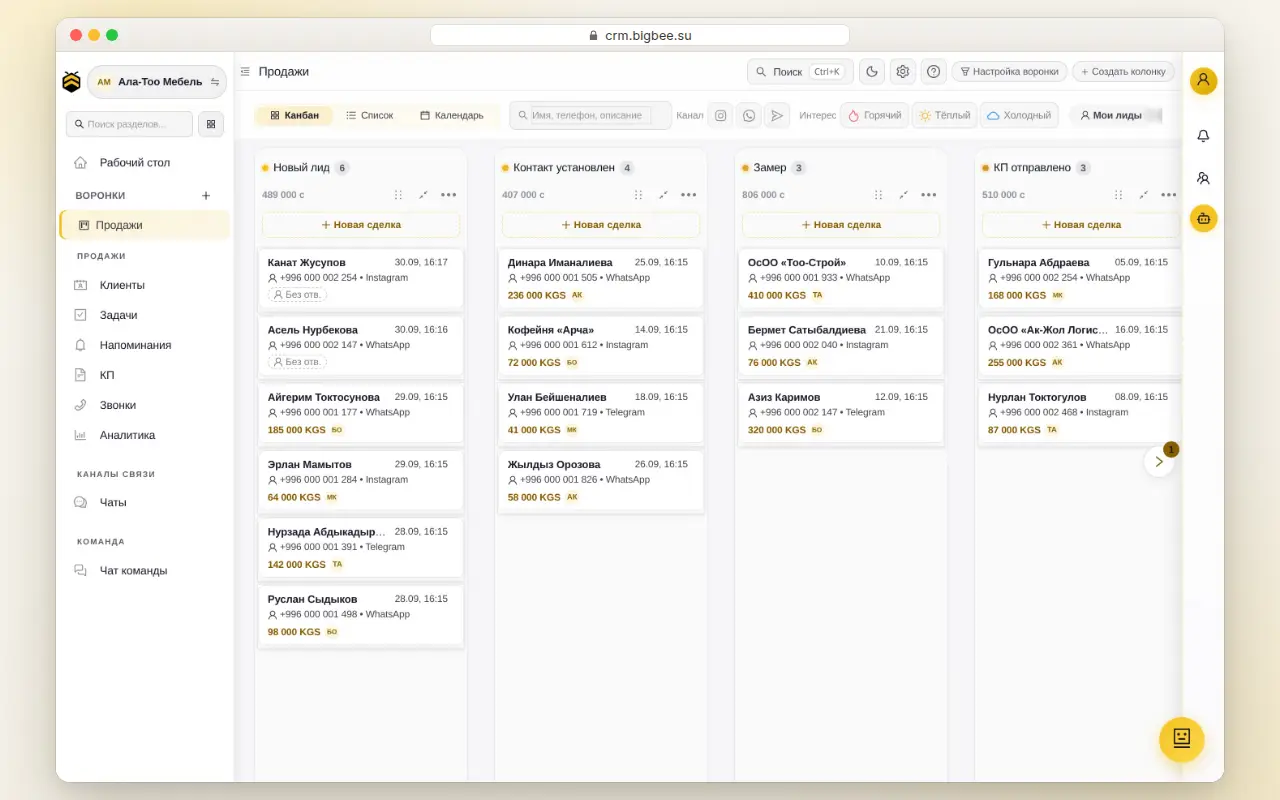
Real product screens on demo data: incoming leads, AI agent replies, AIDAY and calls.
With sound and captions
  1. 1Lead
  2. 2AI reply
  3. 3AIDAY
  4. 4Call
01

Leads from every channel in one pipeline

WhatsApp, Instagram and Telegram messages land as cards in “New lead” — nothing gets lost.
02

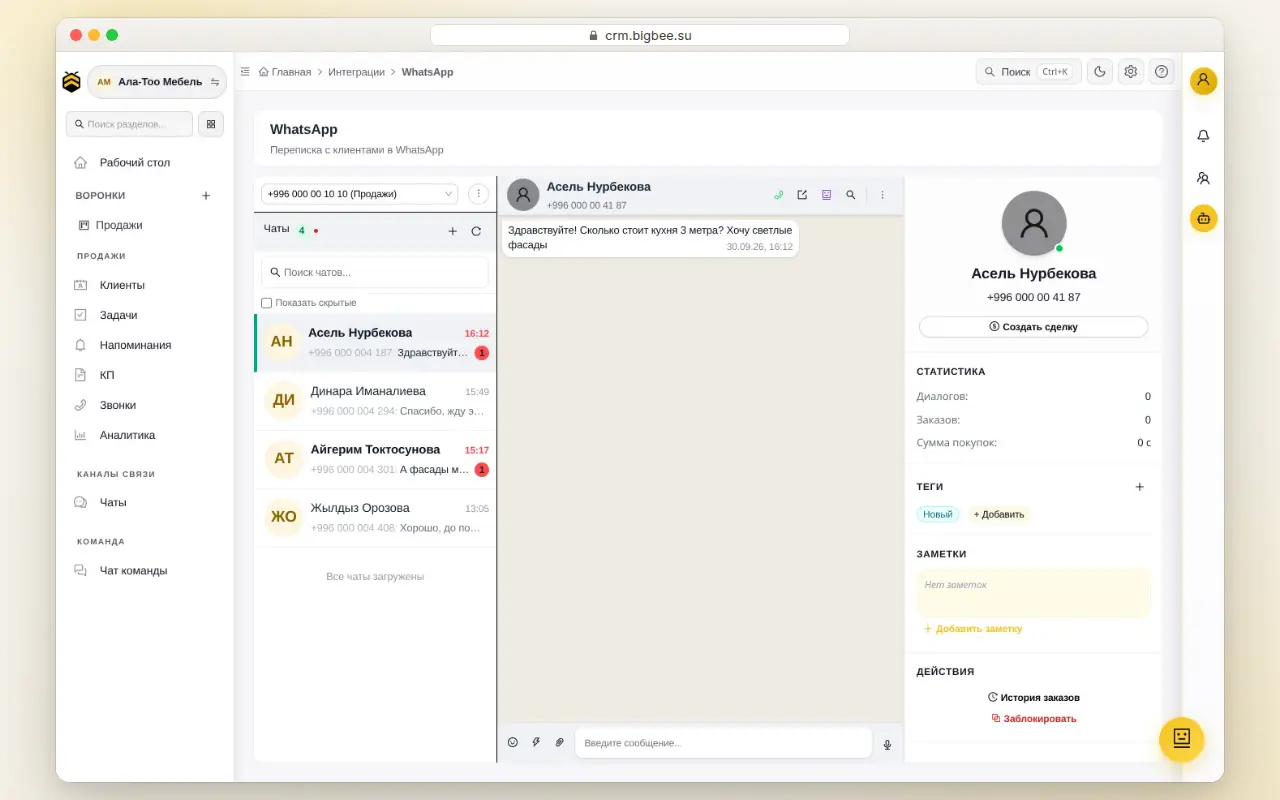
The AI agent answers customers in seconds

Answers price questions and books visits 24/7, while your team is busy or asleep.
03

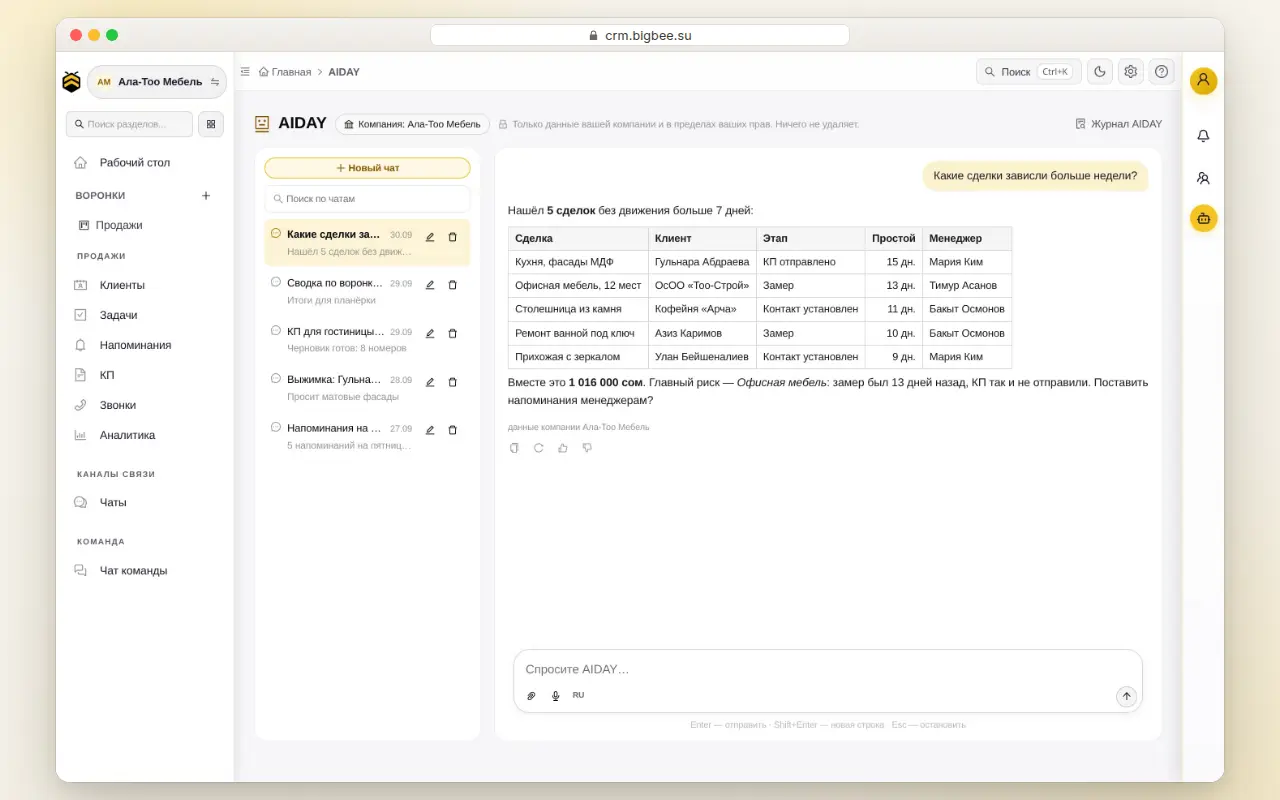
AIDAY: say it and it’s done

Ask in plain words: AIDAY shows what will change and does it once you press “Allow”.
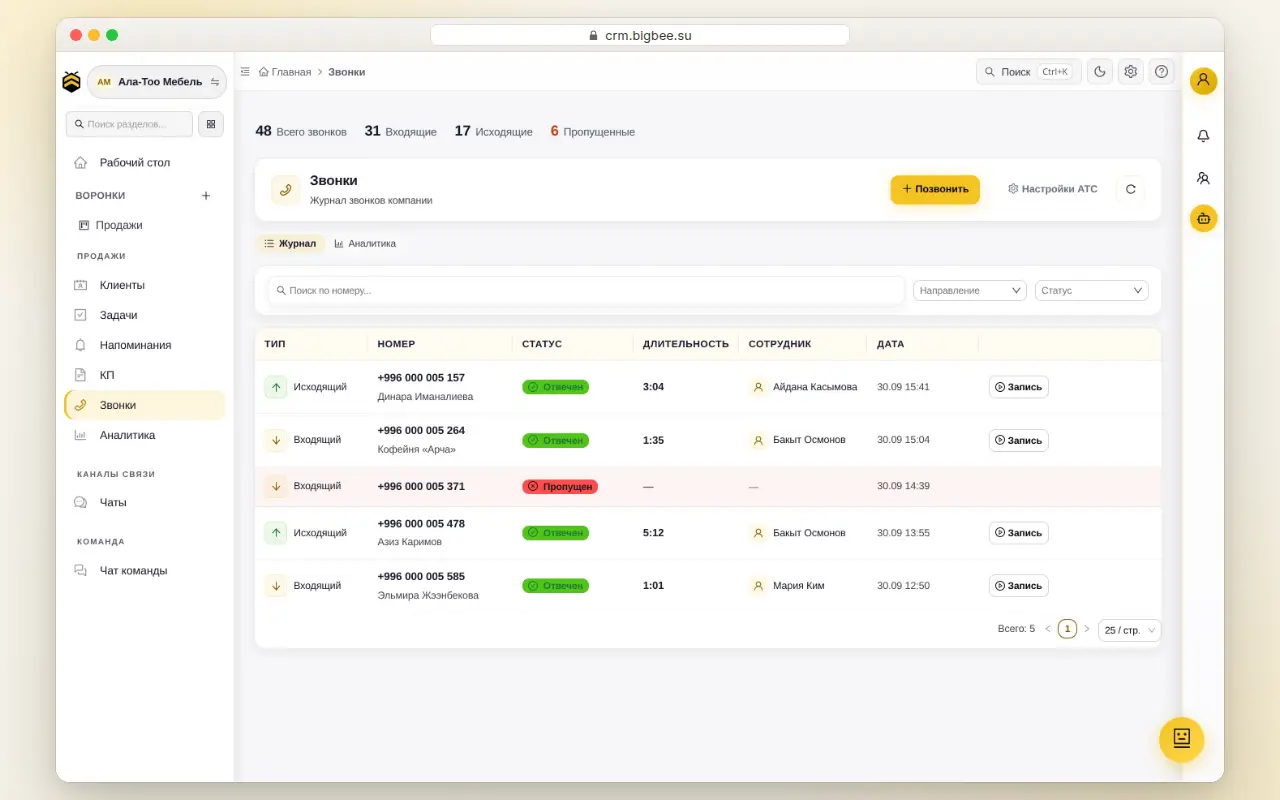
04

Call → lead and a call summary

Every call becomes a lead, and AI writes the summary: agreements and the next step.

New

What’s new in BeeCRM.

An assistant for your team, stage automations, a shared lead pool and team chat with calls. All of it is already available in the product.

AIDAY

An AI assistant for every employee

Ask in plain words or by voice — AIDAY finds, counts and suggests. It sees only your company’s data and only what the employee’s role allows.

Every action comes with a “Confirm” button
  • Finds a customer even with a typo, in Latin instead of Cyrillic, or by the last digits of a phone number
  • AIDAY button on the deal card: “Customer brief”, “What to reply”, “Next step”
  • Per-rep report for any period: deals, revenue, who is waiting for a reply and what is stuck
  • Moves deals and assigns owners in bulk — only after you confirm
  • Voice input in Russian and Kyrgyz
  • Set up the CRM in 5 minutes: a checklist, a pipeline for your niche (salon, construction and renovation, shop, services, real estate) and team invites

AI agents for customers

Reply in WhatsApp, Instagram and Telegram, learn from your real conversations and pause when a rep joins the chat.

Stage robots

Like Bitrix24: “when → if → do”. A lead is stuck, the customer is silent, a deal is won — the robot notifies, creates a task, assigns an owner or moves the deal.

Shared lead pool

Every rep in the pool sees a new lead — first to take it owns it. After that only the owner sees the deal, and the card colour shows whose it is.

Ad analytics

Meta campaigns next to sales: spend, leads, revenue and ROMI — from real CRM deals, not clicks.

Team chat and meetings

Messaging, audio and video calls inside the CRM. “Message” next to the deal owner opens a chat with the deal attached; forward to up to 10 chats, delete your own message within an hour, call and meeting history with recordings.

Employee status

Online, on a trip, do not disturb or offline — for an hour or until end of day; “Away” is set automatically. In “Do not disturb” pushes stay silent except urgent ones, and a pipeline can skip offline reps when assigning leads.

Unit grid for developers

Floors and apartments from Profitbase coloured by status. Pick an apartment and book it right from the deal.

Mobile version

Pipeline, chats and cards work well on a phone: reply to customers and run deals on the go.

Company data isolation

Each company’s data is separated on the server. An employee sees only their companies and only what their role permits.

Platform

Everything already inside BeeCRM.

Not a someday roadmap — this runs in production today. One system instead of messengers, spreadsheets and a dozen tabs.

Omnichannel inbox

WhatsApp Business API, Instagram Direct and Telegram in one window. Voice, media and reactions land on the lead card.

AI sales agent

Replies 24/7, qualifies the lead, suggests a plan and assigns a task to the rep.

Visual scenarios

A no-code “if → then” builder: auto-replies, greetings, reminders, buttons and transitions.

Kanban funnels

Multiple funnels, drag-and-drop stages, custom and required fields to move a deal.

Analytics & SLA

Stage conversion, first-response speed, AI share and revenue per rep.

AI conversation summary

A recap of the chat, the lead temperature and the next step — in one click.

1C integration

Two-way sync of orders, stock and catalog with 1C Trade / Small Firm / Retail.

Bulk broadcasts

Segmented broadcasts to your client base straight in the messengers.

Web forms & leads

Requests from your site and lead magnets drop straight into the right funnel.

Roles & access

Granular rights: owner, admin, manager — everyone sees only what they should.

Tasks & reminders

Deal tasks, deadlines and auto-reminders so no client slips through.

Multi-company

Several companies and branches with separate data, team and storage quota.

Integrations

Connects to the tools you already use.

Messengers, ads, accounting and BigBee ecosystem services — in one deal card. Connect from the Integrations section, no developer needed.

Channels

  • WhatsApp Business APIOfficial API: message templates and the 24-hour window.
  • Instagram DirectBusiness account DMs become deals; reply from the card.
  • TelegramA @BotFather bot: messages flow into the CRM, webhook sets itself up.
  • VoIP and PBXCalls from the card, call recordings and a call log.
  • Website and web formsA form for your site: requests land as deals in the chosen pipeline.
  • EmailYour company mailbox: emails land on the card, reply from the CRM.

Meta advertising

  • Meta Lead AdsFacebook and Instagram lead forms create a deal and a contact.
  • Meta AdsAd spend vs CRM sales: cost per lead, revenue, ROMI.
  • Meta Conversions APICRM events go back to Meta so ads learn from real sales.

Accounting, stock and industries

  • 1CExchange with your 1C base: items, stock, deal export.
  • ProfitbaseDeveloper unit grid: apartment statuses, picking and booking from a deal.
  • BeeStockBigBee warehouse: stock and documents in the Warehouse section.

BigBee ecosystem

  • BeeBoardTasks sync both ways and show up in the Tasks section.
  • BeeBookingOnline booking for customers in the Booking section.
  • HiveClientSingle sign-on to every BigBee service with one account.

Move from amoCRM and Bitrix24

We transfer everything from your old CRM via API, so you don’t start from scratch.

  • Deals
  • Contacts
  • Comments
  • Calls
  • Activities
For whom

Who gets
real revenue.

Teams of 3–50 in service B2C, where customers message you on WhatsApp instead of filling out a form on your site.

Salons and studios

  • Booking from Instagram Direct
  • 24-hour reminders
  • Card with visit history
1–3 day rollout

Travel agencies

  • WhatsApp tours straight into the funnel
  • AI captures budget, dates, party size
  • Task for a rep when the client is ready
Leads handled 24/7, no night shifts

Education

  • Course leads in one inbox
  • Auto-replies on price and start date
  • Lead → payment cohort funnel
See who reached payment

E-commerce

  • WhatsApp order = card in CRM
  • 1C: stock and online payment
  • AI upsell from purchase history
No chat order gets lost
Only in BeeCRM

What others don't have.

Calls, voice AI, 1C, video meetings and Meta ads are built into BeeCRM and live in the same deal card, with no extra services.

  • Calls and telephony

    IP telephony and PBX right in the CRM: call from the card, see who is calling on an incoming call, call recordings and an AI call summary.

    “Calls” section
  • Voice AI agent

    Calls the customer, answers questions, books a meeting and sends the address in WhatsApp. If the customer asks to call later, it calls back on its own. Incoming calls can be routed to the AI too.

    Connected on request
  • 1C sync

    Products and stock from 1C, deals exported to the 1C database — no manual re-typing.

    Integrations → 1C
  • Video meetings

    Built-in video calls with meeting recording. AI writes minutes by speaker and suggests tasks that land in the CRM with one click.

    Meetings
  • Meta ads: lead forms and Conversions API

    Facebook and Instagram lead forms create a deal and a contact instantly, and CRM sales can be sent back to Meta so ads learn from real deals.

    Integrations → Meta

Checked against vendor websites as of October 2026; “not on the website” does not mean the feature cannot exist. Point-by-point comparison below.

Comparison

BeeCRM vs other CRMs, point by point.

BeeCRM and large systems — based on their websites as of October 2026. Only the rows where there is a real difference.

FeatureBeeCRMamoCRMBitrix24
AI agent replies to customers in messengers on its ownIntegrationIntegration
Voice AI agent makes and takes callsIntegrationIntegration
IP telephony and call recordings in the cardIntegration
Video meetings inside the systemIntegration
1C exchangeIntegration
Meta lead forms and Conversions APIIntegrationIntegration
Pricefrom 4,300 som / mo per teamper userplans by number of users

“Not on website” — we did not find it on the vendor website as of October 2026. “Integration” — via a marketplace app or a partner, not built in.

Based on websites as of October 2026: amocrm.ru, bitrix24.ru. Terms may change.

Data

Where your database lives and who can export it.

The customer base is a sales team's most valuable asset. This is how BeeCRM protects it.

  • Servers in Kyrgyzstan

    Database and files are stored on BigBee servers in Kyrgyzstan. HTTPS-only connections.

  • Nightly backup

    Every night a copy of the database and files goes to a second, separate server. 30 daily copies plus monthly ones are kept.

  • Export needs a permission

    Only an employee with the “Data export” permission can export leads and contacts to Excel. The “Manager” role does not have it by default.

  • Activity log

    Who signed in, when and from which IP, what they changed and what they exported. Attempts to open other people's data are logged too. The log is kept for a year.

  • Companies are separated

    Each company's data is isolated on the server. An employee sees only their company and only what their role allows.

  • Keys are encrypted

    Integration tokens and keys — WhatsApp, Instagram, AI providers — are stored encrypted.

Pricing

Transparent. In som.
No hidden modules.

You pay a fixed price for the whole team, not per seat. No 30-module plan where you use 3.

Trial
Try everything
0som · 14 days
Free, no card
  • All Enterprise features for 14 days
  • WhatsApp · Instagram · Telegram
  • AI agent: 300 replies, no key needed
  • No credit card
Starter
Micro team, one channel
4 300som / month
≈ $49 / mo
  • Up to 3 users
  • 1 WhatsApp number
  • 500 AI agent replies / month
  • Funnels, kanban, tasks
  • 1 GB storage
Popular
Pro
Teams of 4 to 10
8 700som / month
≈ $99 / mo
  • Up to 10 users
  • 2 WhatsApp numbers · Instagram · BeeChat
  • 5 000 AI agent replies / month
  • Scenarios and automation
  • Advanced analytics
  • 10 GB storage
Enterprise
15+ people
17 400som / month
≈ $199 / mo
  • Unlimited users
  • Up to 20 WhatsApp numbers · 2 Instagram · BeeChat
  • Unlimited AI agent replies
  • AI trained on your chats
  • Priority support
  • Dedicated onboarding
Contact us

All plans include VAT. You are billed in KGS; the USD price is for reference at the NBKR rate. Pay by card via O!Bank, by QR via O!Dengi, or by bank transfer.

FAQ

What people usually
ask.

Didn't find an answer — message us on WhatsApp +996 500 93 55 66

What does "AI agent sells on its own" mean?
The AI replies to your customer on WhatsApp / Instagram / Telegram within seconds, finds out what they need, answers routine questions (price, hours, availability) and creates a task for a human rep when the customer is ready to buy. You see the whole conversation and can take over manually at any time — one click pauses the AI.
Do I need my own OpenAI / Claude key?
No. The AI agent runs on our key within your plan's reply allowance — just set up the agent and turn it on. If you want no limits from our side, you can connect your own DeepSeek, OpenAI or Claude key.
Is connecting WhatsApp with a QR code official?
Yes. It is Meta's official method for WhatsApp Business app numbers: you sign in with Facebook, pick the number and scan the QR code in the app. The number keeps working on the phone and chat history syncs into the CRM. No third-party gateways — only Meta's WhatsApp Business Platform.
How long does setup take?
1 to 3 days. Registration — 5 minutes. WhatsApp Business API connection — a day, because Meta has to verify the number. Scenarios and AI training on your data — one call with our manager.
Where is the data stored?
Servers in Kyrgyzstan, with a nightly backup copied to a second server. HTTPS only; integration keys and tokens are stored encrypted. Each company's data is isolated: employees see only their company and only what their role allows. Deleting your company along with all data is one button in settings.
Can I migrate from amoCRM / Bitrix24?
Yes. The migration wizard in Integrations moves deals, contacts, comments, calls and activities from amoCRM or Bitrix24 via API. Contacts and deals can also be imported from CSV. WhatsApp / Instagram chat history transfers if your number is already on Business API.
What happens after the 14-day Trial?
Read access remains, new messages and deals are paused. You pick a plan and continue without losing history. No autocharges — no card is requested on Trial.

Put AI on shift
today.

14 days of Enterprise free, no card. Connect WhatsApp in an hour and close deals while competitors are still training reps.

Message WhatsApp
No card Launch in a day Russian support